SCOPIO LABS

Designing for AI Ambiguity

Designing for AI Ambiguity

Designing for AI Ambiguity

Transforming Morphology data uncertainty into a supportive expert workflow

Role:

Lead Product Designer

Transforming Morphology data uncertainty into a supportive expert workflow

Role:

Lead Product Designer

Overview

The Product: Digitalizing Hematology Scopio transforms the traditional microscope-based lab into a fully digital workflow.

How it works:

How it works:

  • Hardware: Scans physical slides at high resolution (100X).

  • AI Software: Automatically detects, classifies, and groups thousands of cells.

  • Hardware: Scans physical slides at high resolution (100X).

  • AI Software: Automatically detects, classifies, and groups thousands of cells.

The Shift: Experts move from manually searching for cells under a microscope to validating AI suggestions on a screen.

Our Users

As Clinical Laboratory Scientists (CLSs), our users operate under constant pressure to reduce Turnaround Time (TAT) while managing increasing test volumes with limited staffing.

Despite the need for speed, they demand Safety and Accuracy above all else. They are willing to trust the system, but need to feel in Control of the process.

The Product Challenge

Solving the "Unclassified" friction

The Pain: Finalizing a BMA (Bone marrow aspirate) report requires manually classifying thousands of cells that fell below the AI's safety threshold - currently a slow, single-cell process.

The Solution

A safety-first workflow for rapid bulk classification

The Fix: We replaced the slow manual sorting with a smart validation interface. By grouping uncertain cells into tentative suggestions, experts can process thousands of cells in seconds and yet, maintaining full control without compromising accuracy.

PBS slide
90% of the slides

BMA slide
10% of the slides

Design Challenges

Design Challenges

Design Challenges

01

Designing for Low-Confidence AI

Designing a non-intrusive way to surface low-confidence AI suggestions without creating Diagnostic Bias.

02

Integrating Bulk Actions into Existing Systems

Implementing high-speed validation tools within a complex ecosystem without disrupting established, single-cell workflows.

Logic Mapping

The solution

Designed Screens

Designed Screens

These screens are the outcome of a research-led design process, refined through wireframes and aligned with development time constraints.

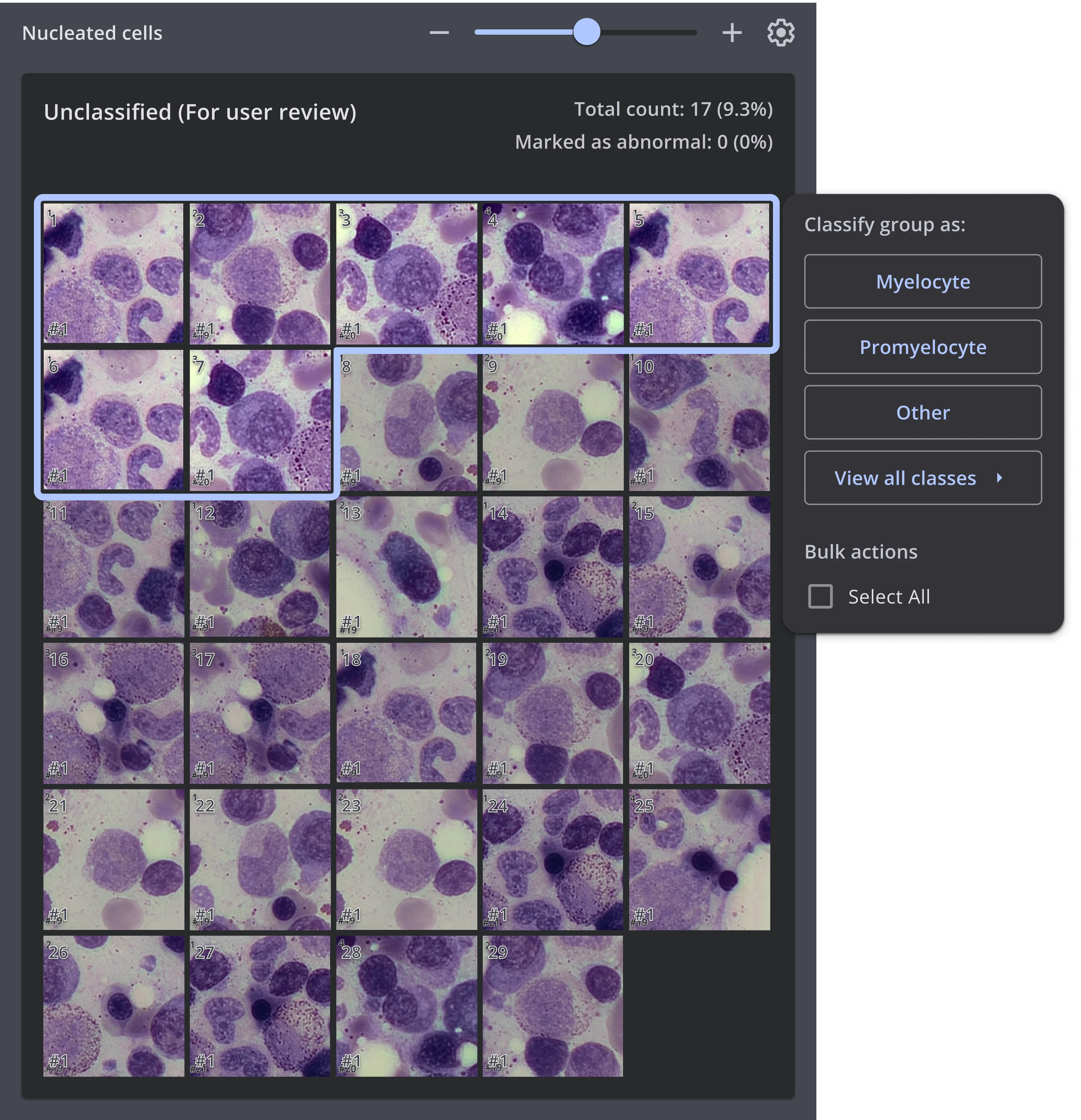
AI Suggestions: Reveal on Hover

To solve the visual noise and bias issues, I implemented a hover-reveal pattern. The suggestion appears only when the user signals intent via hovering, enabling immediate bulk classification.

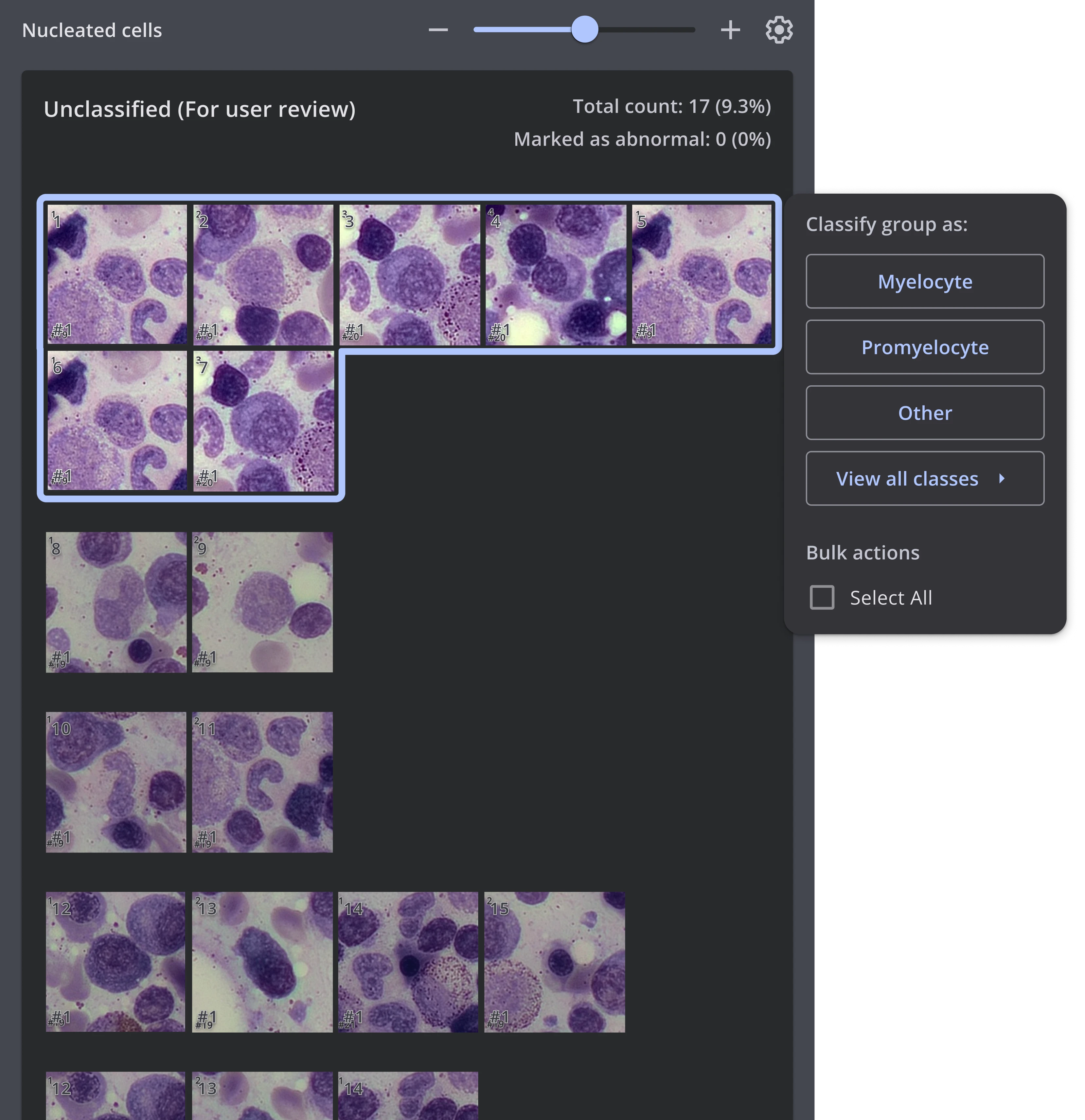
Tailoring the View

Following user feedback, I introduced an option to tailor the unclassified bulk view.
Experts can now switch between a continuous stream (for speed) and a row-based breakdown (for structure) via settings while maintaining the clean hover-reveal pattern in both modes.

Bulk Actions & Editing

Clicking "Select All" instantly triggers the system’s native Floating Toolbar.
This allows users to refine the selection (add/remove specific cells) and perform advanced bulk actions beyond the tooltip's capabilities.

Success Metrics & Behavioral Analysis

Success Metrics & Behavioral Analysis

Quantifying efficiency and validating user workflows through data-driven insights.

Time-to-Report Reduction

Metric: Average time to clear the "Unclassified" bucket (Bulk Actions vs. single-cell workflow).

Goal: Reduce manual classification time by ~20%.

Layout Usage & Adoption

Metric: 68% adoption rate for the "Split View" layout

Goal: Validate the necessity of customizable workspaces for different user personas.

Selection-to-Action Conversion

Metric: 80% of "Select All" clicks leading to a successful Toolbar action.

Goal: Verify that the "Global Selection" pattern is intuitive and leads to task completion.

Thank You For Your Time!

Thank You For Your Time!

If you have any questions, feedback or would like to discuss my work further, feel free to get in touch :)

View Project

Bat Chen Ben Arza 2025 Ⓒ

The Solution

AI Suggestions: Reveal on Hover

To solve the visual noise and bias issues, I implemented a hover-reveal pattern. The suggestion appears only when the user signals intent via hovering, enabling immediate bulk classification.

The Solution

Tailoring the View

Following user feedback, I introduced an option to tailor the unclassified bulk view.
Experts can now switch between a continuous stream (for speed) and a row-based breakdown (for structure) via settings while maintaining the clean hover-reveal pattern in both modes.

The Solution

Bulk Actions & Editing

Clicking "Select All" instantly triggers the system’s native Floating Toolbar.
This allows users to refine the selection (add/remove specific cells) and perform advanced bulk actions beyond the tooltip's capabilities.